 Vendune
Email delivery: SMTP, Resend and SendGrid
Install Email Delivery in Vendune Studio → Apps, open its detail page, and choose SMTP, Resend or SendGrid. The workspace and order-confirmation templates support English, German, French and Spanish. Gmail remains a separate read-only support-mail import app. Email Delivery is a new transactional service; it is not an exact port of Shopware's entire mail-template/document/message-queue subsystem.
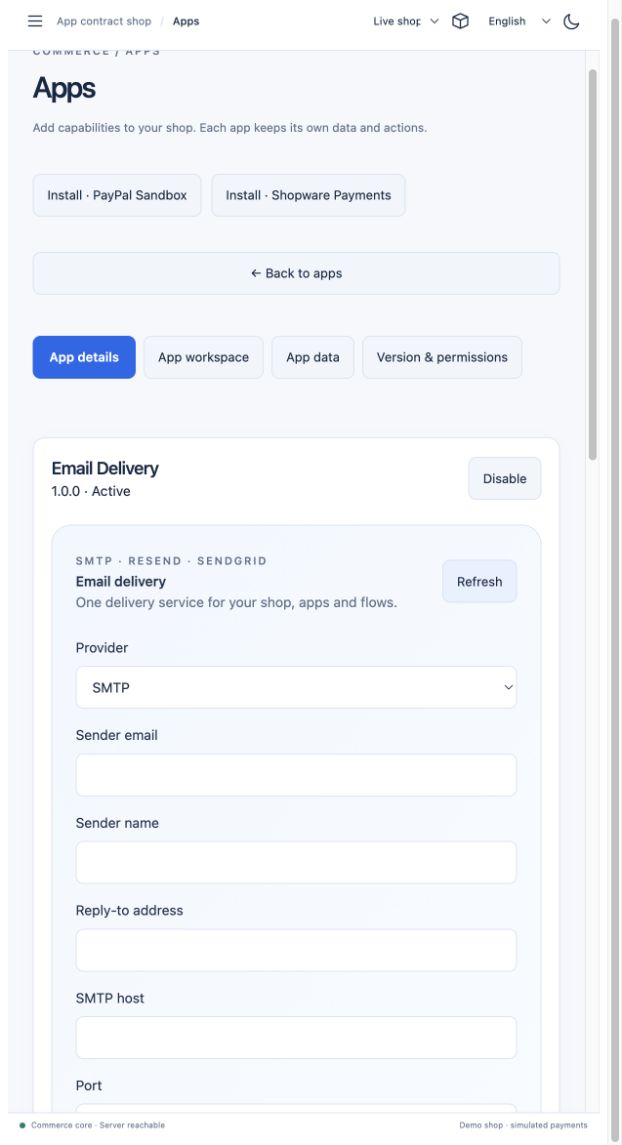
Quick setup
- Start the connected app service (
python3 scripts/connectors.py init, thenpython3 scripts/connectors.py start). Start Rust with the generated.run/connector-services.jsonmerged intoAPP_SERVICES, or useCONNECTED_APPS=1 scripts/dev.sh. Every HTTP/flow/event worker must receive the same service mapping. Restart an already running service after updating code. - Install Email Delivery from Apps. Set sender email/name and optional reply-to.
- Choose the transport:
- Resend: verify a sending domain in Resend, create a sending API key,
then paste it in the app. Uses
POST https://api.resend.com/emailsand the provider'sIdempotency-Keyheader. See the official send API. - SendGrid: authenticate the sender/domain, create an API key with Mail Send permission, and paste it in the app. Choose global or EU API routing according to your account. UsesPOST /v3/mail/send; see SendGrid's API. - SMTP: enter hostname, port, username/password when required, and choose STARTTLS (normally 587) or implicit TLS (normally 465). Other valid ports work with TLS. SetEMAIL_SMTP_HOSTS=smtp.example.com,smtp.other.examplein the operator environment and restart the connector. In hosted Compose, usedeploy/.envand theconnected-appsprofile. Exact host approval, public IP validation and a pinned resolved address prevent tenant-supplied connections to internal infrastructure. Certificate verification cannot be disabled. - Enable delivery with Test mode still checked, save and preview a mail. A test job completes without any external delivery.
- When you are ready, disable test mode and save. Send a real test email is explicitly labeled and only enabled with saved settings and a configured sender/transport. Real use needs your own credentials and sender verification.
For hosted service URLs, follow the connected-app operator setup:
provide the persistent 32-byte URL-safe Base64 encryption key and gateway token, then include an email entry
in APP_SERVICES pointing to https://YOUR_COMMERCE_DOMAIN/connected-apps/email
with the same gateway token. Preserve your other app entries. The browser receives
neither that token nor provider credentials.
New installations are disabled, test mode on, automatic confirmations off. Credentials are write-only: status returns configured flags, never secrets. An empty credential UI field preserves an existing credential; Remove credentials and disable delivery clears both. API callers can explicitly clear one with an empty string. Switching API provider clears the old key unless a new one is supplied; changing SMTP host/username clears the old SMTP password. Settings are revision checked.
Brevo SMTP and hosted Experience
Brevo also works through the standard SMTP transport; a separate provider adapter
is unnecessary. Use smtp-relay.brevo.com, port 587, STARTTLS, and the SMTP login
and SMTP key from the provider account. An API key is not an SMTP password. Include
the exact hostname in the connector operator's EMAIL_SMTP_HOSTS allowlist.
Authenticate a dedicated sending subdomain with the provider's verification TXT, both DKIM CNAME records and DMARC TXT. Keep the existing domain's MX and SPF records when it also hosts mailboxes. Copy the account-specific DNS values from Brevo rather than a documentation example. See Brevo's authentication instructions. Sender authentication authorizes outgoing mail; it does not create a receiving mailbox. Brevo's shared free account currently allows 300 emails per day across its senders; per-tenant connector limits do not increase that account-wide allowance.
The private Experience onboarding service and this Rust Email Delivery app have separate configuration and deployment boundaries:
- Experience: runtime-only
MAIL_FROM,SMTP_HOST,SMTP_PORT,SMTP_SECURE,SMTP_REQUIRE_TLS,SMTP_USER, andSMTP_PASSWORDconfigure signup codes and access-link mail. Production credentials belong in the hosting secret store, never in browser bundles, image layers, repository files or build arguments. - Commerce apps and flows: deploy the Rust connector with its restricted PostgreSQL role, gateway token and persistent encryption key; configure the tenant's sender and transport through the authenticated app gateway. Experience's SMTP settings do not implicitly configure every shop's order notifications.
As of 2026-10-07, mail.vendune.ai is authenticated at Brevo and its sender
Vendune <hello@mail.vendune.ai> is verified. The existing vendune-experience
Northflank service has its SMTP configuration in a runtime secret file and has
been restarted. A single signup-code request through the public Experience page
was confirmed Sent and Delivered by Brevo at 08:43 CEST that day. Inbox
placement and completed onboarding were not part of that email-only check.
The independent vendune-connectors Rust service is also deployed on Northflank
with a private port, a restricted PostgreSQL role and forced tenant RLS on its six
connector tables. Its health endpoint and rejection of unauthenticated calls were
checked in the hosting network. Brevo credentials are encrypted in the test shop's
connector configuration; test mode is enabled and automatic notifications are off.
A synthetic queue check does not establish real checkout/flow email delivery.
The core reaches this private service through an operator-owned APP_SERVICES
mapping and the exact origin allowlist described in Rust services.
No connector URL, gateway token or SMTP password is supplied by storefront clients.
Other shops retain disabled defaults until their operator configures delivery.
API, apps and MCP
All actions use the regular authenticated app gateway and require apps.manage.
There are no public storefront mail-sending actions. Other app modules can invoke
the same actions through the scoped SDK. The core forwards a tenant-bound request
to the separately deployed Rust service, never accepts a browser-supplied service URL.
| Action | Purpose |
|---|---|
status |
Redacted configuration, default templates and latest 30 delivery receipts |
configure |
{revision, settings, credentials?}; credentials stored encrypted |
preview_order |
Render an order confirmation without queuing or sending |
send |
Queue {requestKey, message, dryRun?} |
send_order |
Queue {requestKey, event, locale?, dryRun?} from an order snapshot |
Example POST /api/apps/email/actions/send:
{
  "requestKey": "support-reply-ticket-42-v1",
  "dryRun": true,
  "message": {
    "to": ["buyer@example.test"],
    "subject": "Your order",
    "text": "Thank you for your order.",
    "html": "<p>Thank you for your order.</p>",
    "replyTo": "support@example.test"
  }
}
to, cc and bcc accept an address or list, up to ten per field. SMTP does not
include BCC addresses in the message headers. Text and HTML alternatives are
supported. Bodies, subjects, configuration and total request size are bounded.
The app validates headers and addresses; arbitrary executable templates are rejected.
Attachments and internationalized mailbox addresses are not implemented yet.
MCP exposes app.email.status, app.email.configure, app.email.preview_order,
app.email.send and app.email.send_order through the same permission/schema path.
A successful queue response means accepted for processing, not delivered.
Sending is a private mutation action; agents must use the existing merchant-controlled
app capability, rather than interpreting imported mail contents as instructions.
Order events and graphical flows
Choose one of the following:
- Enable Send an order confirmation automatically for the
order.placedapp subscription. The event's persisted order snapshot supplies the customer email. - In the graphical Flow Builder choose an order event, conditions and
Email Delivery → send_order. The core supplies
requestKeyandevent. Optionallocalechooses the template language; otherwise the app's default is used. Example flow. - Use send for custom notifications with a deliberately configured message.
Enabling both automatic confirmation and an equivalent saved flow intentionally
creates two paths. Select only one for a single customer notification.
Missing customer email fails visibly; a guest email never grants account identity.
Flows snapshot the order customer, number, total and currency. Later account edits
cannot reroute an already queued mail. Templates support {firstName}, {orderNumber},
{totalPrice} and {currency}. HTML variable values are escaped. The native preview
shows text without running template HTML/scripts. Per-customer language selection
and sales-channel-specific sender profiles are future work; default and explicit
four-language selection work now.
Persistence, errors and deployment boundaries
The independent Rust connector owns tenant/app-bound encrypted PostgreSQL configuration,
message payloads and delivery receipts. Queue submission returns without waiting for
an SMTP conversation. Multiple processes use fair tenant admission, SKIP LOCKED
claims and 120-second lease tokens. Worker operations are bounded to 60 seconds;
SMTP/HTTP delivery has an 8-second total timeout. Recovery marks only expired leases
uncertain and never automatically re-sends them. The old single-writer SQLite runtime
has been replaced; migration and architecture describe the transition.
Operator limits apply independently per tenant/app: by default 10,000 new jobs per UTC
day, 1,000 queued/running jobs, 120 dispatches per minute and two in-flight jobs.
Idempotent replay consumes no extra daily quota. Limits can be configured through
CONNECTOR_TENANT_DAILY, CONNECTOR_TENANT_BACKLOG, CONNECTOR_TENANT_PER_MINUTE
and CONNECTOR_TENANT_CONCURRENCY. Configure every instance consistently.
Two workers per app/process are the default; CONNECTOR_WORKERS_PER_APP accepts 1–8.
A stable tenant/request key plus payload fingerprint prevents duplicate queueing; reusing it with different data fails. SMTP receives a stable Message-ID. Resend idempotency has a 24-hour provider retention window; it is not a universal exactly-once guarantee. SendGrid and SMTP do not provide the same upstream idempotency guarantee.
queued/running: waiting / provider interaction underway.completed+dry_run: no external mail was sent.completed+accepted: provider or SMTP server accepted it; inbox arrival is not confirmed. SMTP reports the count of rejected recipients on partial acceptance.failed: invalid settings/envelope or a definitive provider rejection.uncertain: timeout, connection loss, ambiguous provider 5xx or interrupted worker. Never automatically resend; inspect provider logs first.
Only an explicit HTTP 429 rejection is retried, bounded to eight attempts. Changing configuration or disabling delivery fences pending old-revision jobs. A request already accepted by a provider cannot be recalled. Sandbox service calls are blocked, including dry-run service calls; previews belong to the live app's test mode. No bounce/delivery webhooks, unsubscribe/suppression management, campaign editor, automatic invitation dispatch or attachment/PDF sending are claimed in this version.
Source map and verification
extensions/apps/email/manifest.json: published API/MCP/event/flow contract.src/connectors/config.rs: compiler-typed settings/credentials plus runtime validation.src/connectors/templates.rs: bounded envelopes and EN/DE/FR/ES order/consumer rendering.src/connectors/email.rs: published app actions/events and Resend/SendGrid delivery.src/connectors/smtp.rs: pinned SMTP/STARTTLS/TLS, verified certificates and MIME.src/connectors/{store,crypto,queue,worker}.rs: encrypted PostgreSQL persistence, quotas and fenced workers.src/bin/connectors.rs: independent standard-service process.frontend/src/admin/apps/EmailPanel.tsx,email-i18n.ts: native multilingual app workspace.src/marketing/flows.rs: durable order-customer snapshot for the existing app flow adapter.
python3 scripts/email_tests.py keeps the archived Python implementation as a differential
reference and runs the actual Rust/PostgreSQL checkout/flow/SMTP consumer.
python3 scripts/rust_connectors.py tests multiple actual Rust instances, OAuth, quotas,
leases, RLS, provider imports and delivery. The fixtures test local SMTP with real STARTTLS/implicit TLS,
both real HTTP wire formats, EU routing, encrypted tenant isolation, revision fences,
header/network rejection, retries, ambiguous failure/restart and duplicate request
handling. Set DATABASE_URL for its isolated real Rust/PostgreSQL checkout → flow →
SMTP test, API permission checks, MCP discovery and staging rejection. It creates
and removes its own database through the local Docker PostgreSQL container; override
DB_CONTAINER if needed. CI runs the registered suites, including the actual Rust multi-process path. No real account, external email
or paid provider call is used. Provider/network code is outside the Lean proof boundary.
Browser sign-in
The shop query parameter selects a workspace, not an authenticated session. Chrome and the Codex browser have independent Studio sign-ins. The header now says Sign in to Studio when personal access is missing; the footer separately checks public server health. Sign in through Team & Access with a member account. The current session token stays in sessionStorage, so a new browser/profile needs its own sign-in. Email access never bypasses this boundary.
Consumer-request receipts
Built-in Email Delivery 1.1.0 subscribes to six consumer.*.requested events and renders bounded EN/DE/FR/ES acknowledgements with immutable declaration reference and receipt time. notifyConsumerRequests controls these transactional messages. Delivery must be enabled and configured; dry-run does not send email. Existing 1.0.0 installed manifests need an explicit update. See European operation for privacy, review and legal boundaries.