 Vendune
Try the connected commerce playground
This is the legacy furniture compatibility walkthrough. The shipping default
is now Nord Atelier; see the current illustrated feature tour
for its coats, size variants and photographs. The setup CLI below still uses
fixed mug/lamp/chair IDs and needs DEMO_CATALOG=legacy-furniture in the local
server configuration before creating this playground. It does not translate
a fashion shop into the legacy catalog or rewrite an existing shop.
The playground is a separate synthetic shop under your personal merchant account. It has its own catalog, inventory, orders, apps, rules and settings. Its active order flow needs no AI model, mail provider or real payment account. Setup creates no orders; you place them through the storefront.
Create your playground
- Set
DEMO_CATALOG=legacy-furniturein the private.env, then start/restart the app with./scripts/dev.shand openhttp://127.0.0.1:8787/#merchant. - Create a personal merchant account using Create shop on the Studio login page, or sign in to your existing account. Merchant accounts and customer accounts differ.
- In another terminal, from the repository root, run:
sh
   python3 scripts/playground.py --email your-personal-merchant@example.test
Enter that account's password at the private prompt. The script uses only the
local HTTP API. It creates Commerce Playground, prints four links and
records its ID in ignored .run/playground.json. No password or session token
is stored in that file. Existing personal COMMERCE_SESSION_TOKEN is also
supported; the instance bootstrap credential is deliberately rejected.
4. Open the printed Studio link. If asked to sign in, use your personal
merchant account. Sign-in selects the account's default shop; select
Commerce Playground in the shop picker / Team & access → Workspace.
Merchant sessions expire after 12 hours. Studio offers Sign in to Studio when the server rejects the current session and clears previously loaded shop data across workspaces. Use the same personal account, then select Commerce Playground again if the account's default workspace differs. Session validation also runs when returning to the visible Studio; it does not use a shared demo credential.
The script accepts loopback HTTP origins only. For a separate local instance use
--base-url http://127.0.0.1:8789. A second independent playground uses another
--state .run/playground-second.json. Re-running with the same state resumes
setup and preserves existing rules, flows, campaigns, app configuration and
company details. It does not reset merchant edits or recreate orders.
A ten-minute tour
| Step | Where to go | Try this | Actual result |
|---|---|---|---|
| Product details | Printed product link | Switch mug variant, image and quantity | SKU-specific availability and prices; core quantity calculation |
| Product extension | Mug detail → engraving | Add a short inscription | The installed Wasm app supplies its own form/rule and a taxed cart contribution |
| Coupon | Cart | Apply TRY10 |
A server-calculated 10% campaign discount, including adjusted taxes |
| Customer account | Storefront → Account | Register your own synthetic customer and sign in | Customer profile/address book and own orders; this is not the Studio login |
| Checkout | Cart → checkout | Choose a valid billing/shipping address, delivery and simulated payment | Immutable order/address/method snapshots and one durable order |
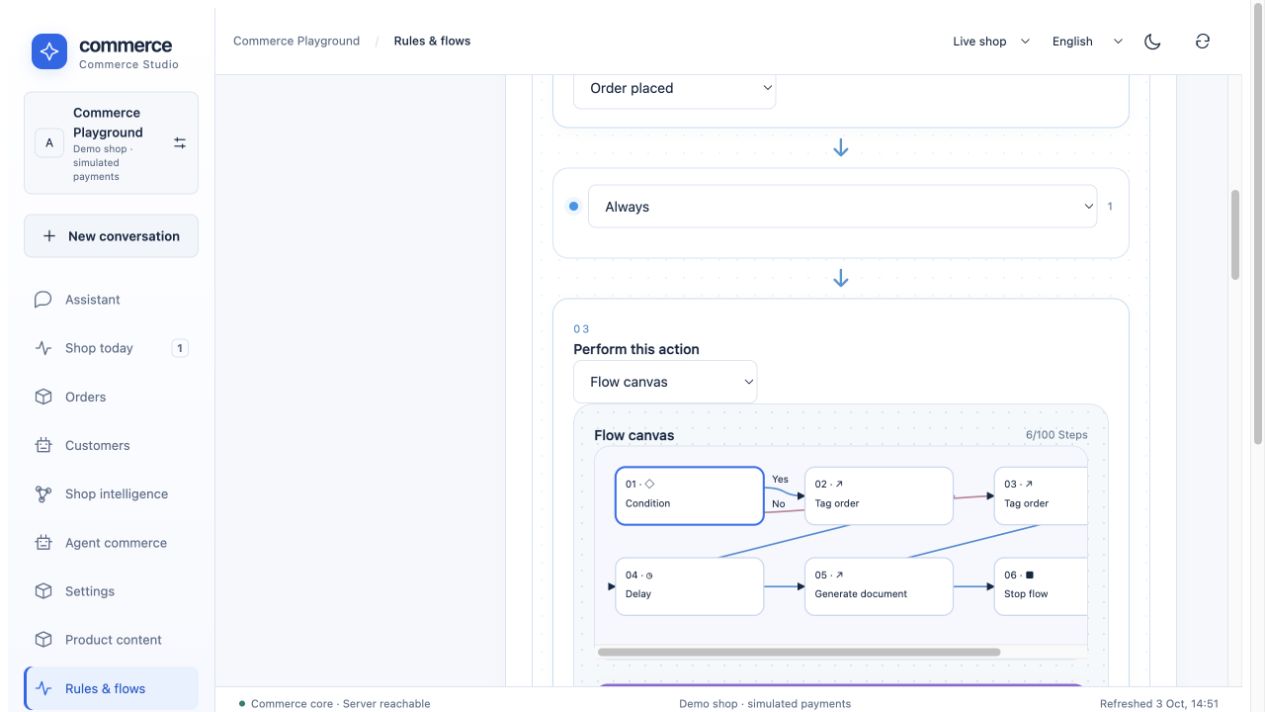
| Standard flow | Place one ordinary mug order below €100 | Studio → Rules & flows → Event flows | The No branch adds playground-standard, creates an invoice and stops |
| Priority flow | Place two lamps, total at least €100 | Same workspace → Flow executions | The Yes branch adds playground-priority, waits 15 seconds, creates an invoice and stops |
| Order operations | Studio → Orders → open your order | Use one eligible next-status action; inspect activity and Documents | State-machine transition/event and the generated numbered PDF |
| Rule editing | Rules & flows → Rules | Edit “Cart total at least €100” | New orders use the changed condition; already queued events retain their frozen definition |
| Sales channel | Printed collection link | Browse Home collection | Only mug, lamp, chair and their variants; a distinct channel-bound cart |
Create a customer account with your own test email/password to exercise registration.
If the instance enables SEED_DEMO=true, it also provides synthetic B2B
buyer@example.test / demo-business. Secure instances with SEED_DEMO=false
intentionally do not create that shared account. Playground setup does not bypass
this setting or install a customer with a public known password.
Choose simulated card for the initial tour. Bank transfer/invoice follow different payment states. Use the default channel if you want the whole sample catalog. Applied coupons and B2B prices can change which side of €100 an order lands on; the flow uses the actual event-time cart total.
The generated invoice uses visibly synthetic issuer details, under Settings → Company details. It is a demo document, not a certified legal/e-invoice. Flow executions refresh every three seconds. Open a run to inspect branch choices, completed actions and a scheduled continuation. Wait for it to complete before checking Orders → Documents. Browser reloads do not discard persisted jobs.
Try the other workspaces
- Products: select one product, maintain its enabled content languages, specifications, rich description/media blocks, SEO metadata and cross-selling.
- Shop knowledge: upload a UTF-8 data sheet or searchable PDF, assign a product and explicitly publish it. Product questions then use that eligible source when a configured model is available. Import/publication does not require a model; answer generation does. No OCR or learned model weights are claimed.
- Staging & releases: create a private environment, edit a product or rule, inspect changes and publish only that selected unit. Staging checkout and external service delivery are disabled. A playground is an independent shop; staging is a private environment within that shop.
- Apps: engraving is installed by setup. Install Email Delivery, Slack, Google Analytics, Gmail, Product Lab or Storyfront separately and follow their own configuration pages. External service examples need an operator service endpoint; OAuth apps additionally need provider clients and consent.
- Storyfronts: use the Storyfront guide to connect the local Storyfront service, import this shop's catalog and transfer checkout back to the same Rust tenant/channel. Scenes and questions may call its configured model provider; setup does not provision another Storyfront or run those calls.
- Developers: import a reviewed declarative app, or explicitly select a model to generate a draft. Inspect its version/digest, install in staging and publish selected app/data units. External Codex/Claude Code use the authorized exported task/MCP path; arbitrary service compilation/deployment stays external.
- Team & access: create a reader invitation or scoped API/MCP key and compare allowed reads with rejected writes. Do not use the instance bootstrap token as a normal merchant integration.
Optional AI, mail and agent clients
The installed flow has no AI, email, Slack or external payment action. To test AI deliberately, create a separate flow, add AI proposal for review, select a configured provider and save it. Order-triggered proposals must still be reviewed before applying changes. OpenAI/Anthropic API credentials are separate from ChatGPT/Claude subscriptions; cloud calls may incur charges.
Email Delivery provides preview/dry-run before real delivery. Configure SMTP, Resend or SendGrid before using a real-send node. Slack/Gmail/Analytics need their own credentials. No provider credentials are included in the playground. Connect a local MCP client using connectors.md; automation HTTP and MCP use the same handlers and rights. Hosted clients need a reachable HTTPS backend; localhost cannot serve a remote ChatGPT/Claude account directly.
What “try everything” means here
This tour covers the implemented prototype. Disabled rules, complete original FlowSequence import/export, all upstream triggers/configurations, production identity recovery, Shopware Payments and production checkout certification remain outside it. Automation contracts, feature inventory and the Shopware parity matrix give precise boundaries.
scripts/automation.py, in the isolated integration suite, runs the same setup
CLI, edits a rule, repeats setup to prove that the edit survives, and places both
orders. It checks their actual tags and generated invoice records. It also checks
that the state file contains no session token and has private permissions.
The suite uses no paid provider, mail delivery or live payment account.
Manage the catalog
Open Products in Studio. Search by name or product number, filter status, category or low stock, then select a row. Use Create product, enter a unique number/name, price/stock and category, and save. New products start inactive; activate deliberately to expose them in the Store API. Edit enabled content languages and rich descriptions in the same detail view. Under Categories, manage the translated tree; the storefront category bar uses those real assignments. Full product guide and scope.